
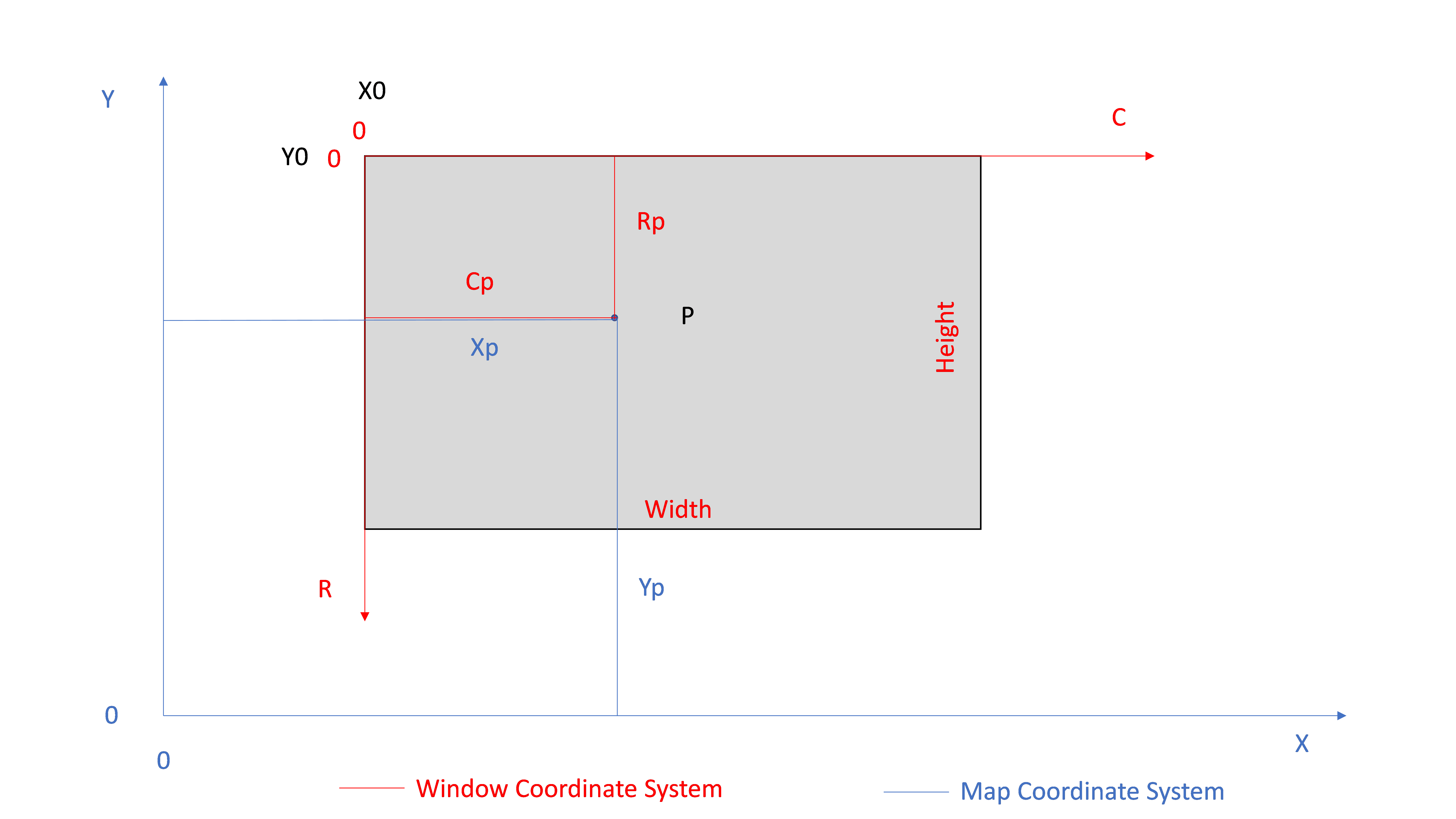
To draw the map data onto a window or picture box, you need to create a transformation between map coordinate system and picture box coordinate system. Normally this transformation is a similarity transformation between two coordinate systems (map and window coordinate systems). Generally this transformation includes 2 translation and 2 scale parameters (Figure-1), and rotation sometimes. Here we assume there is no rotation between two coordinate systems.
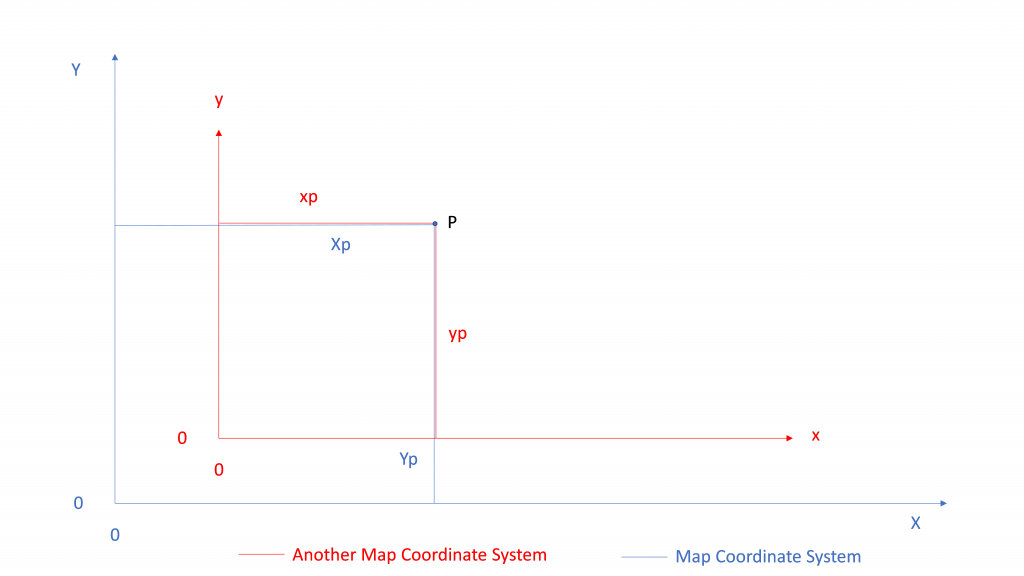
But it is a little bit different when one of the coordinate systems is window or picture box since its coordinate origin is upper left corner of the component. But similarity is still valid. Transformation equations of map and window coordinate system are defined as below.
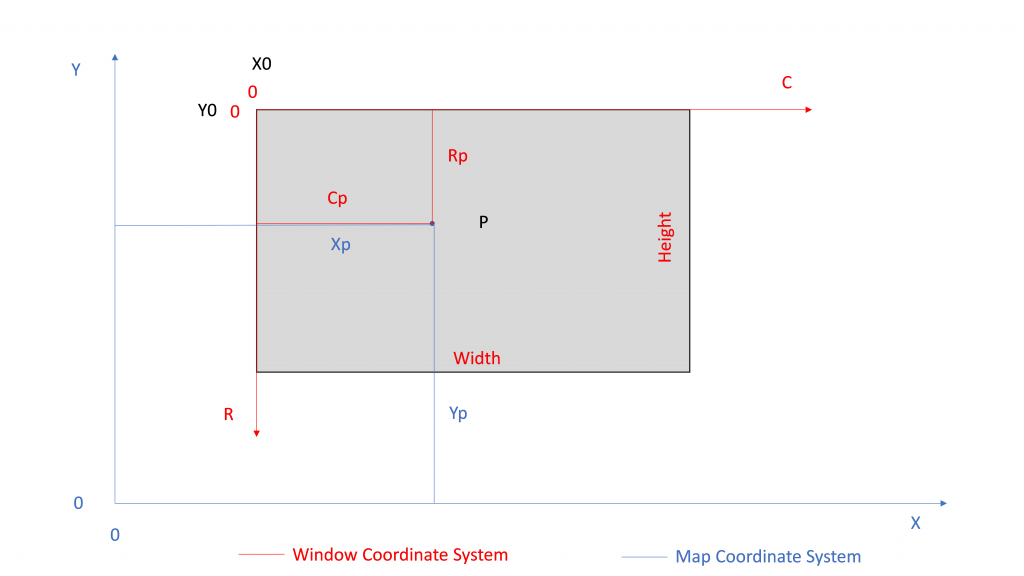


The definitions of the parameters:
- Xp is X coordinate of point P in metric units
- Yp is Y coordinate of point P in metric units
- Cp is Column coordinate of point P in pixels
- Rp is Row coordinate of point P in pixels
- X0 is X coordinate of Upper Left corner of the Window in metric units
- Y0 is Y coordinate of Upper Left corner of the Window in metric units
- Sx is scale on X axis in metric/pixel units (metric width of 1 window pixel)
- Sy is scale on Y axis in metric/pixel units (metric height of 1 window pixel)
C# code (*) of MapToWindow Transformation and WindowToMap Transformation are below.
        double X0;
        double Y0;
        double Sx;
        double Sy;
public bool ComputeParams(PointCoor UpperLeft, PointCoor LowerRight, int WinWidth, int WinHeight)
{
if (LowerRight.X <= UpperLeft.X)
return false;
if (LowerRight.Y >= UpperLeft.Y)
return false;
if (WindowHeight <= 0)
return false;
if (WindowWidth <= 0)
return false;
X0 = UpperLeft.X;
Y0 = UpperLeft.Y;
SX = WinWidth / (LowerRight.X - UpperLeft.X); //pix/m = 1/Sx
SY = WinHeight / (UpperLeft.Y - LowerRight.Y); //pix/m = 1/Sy
return true;
} public PointCoor MapToWindow(PointCoor MapPnt)
{
double x = (MapPnt.X - X0) * SX; //pix=(m+m) * pix/m
double y = (Y0 - MapPnt.Y) * SY;
return new PointCoor(x, y);
} public PointCoor WindowToMap(PointCoor WinPnt)
{
double x = (WinPnt.X / SX) + X0; //m=(pix/(pix/m)) + m
double y = Y0 - (WinPnt.Y / SY);
return new PointCoor(x, y);
}(*) THE SOFTWARE IS PROVIDED “AS IS”, WITHOUT WARRANTY OF ANY KIND, EXPRESS OR IMPLIED, INCLUDING BUT NOT LIMITED TO THE WARRANTIES OF MERCHANTABILITY, FITNESS FOR A PARTICULAR PURPOSE AND NONINFRINGEMENT.
Hi.
Thanks for the comment.
Generally mouse wheel is used for zoom and mouse cursor position is the zoom center.
Greetings…
With havin so much content and articles do you ever
run into any problems of plagorism or copyright
violation? My website has a lot of completely unique content I’ve
either authored myself or outsourced but it seems a lot of
it is popping it up all over the web without my agreement.
Do you know any ways to help protect against content from being stolen? I’d really
appreciate it.
Hi.
Thanks for the comment.
I didn’t search any protection.
Greetings…
This post offers clear idea in favor of the new users of blogging, that actually how to do blogging and site-building.
Excellent post. I used to be checking constantly this weblog and I am inspired!
Very helpful info specially the last phase 🙂 I care for such info much.
I was seeking this certain information for a long time.
Thank you and best of luck.
Thanks.
Hello, I enjoy reading all of your article post. I like to
write a little comment to support you.
Thanks.